About setup, compliance or running your first campaign, our team is ready to assist. Browse our FAQs below or reach out directly.
Visit the Shopify App Store, search for “Win Back,” and click “Install.” Shopify will ask you to approve the app. After installation, you’ll be provided with step‑by‑step instructions and a link to our support guide to complete configuration.
No coding is required. Win Back automatically injects the necessary consent checkboxes and scripts into your storefront. You can customise the appearance in the settings—no theme edits needed.
Yes, you can add custom CSS directly from your Shopify theme settings:
Yes. Win Back complements loyalty, reviews, discounts and email/SMS tools. Because Win Back writes data directly to native Shopify, it doesn’t conflict with third‑party apps—you simply use that data in whichever tools you already run.
We don’t offer a full complimentary install service. The standard install on a Shopify 2.0 theme is straightforward. If you’d like custom placements or advanced setup, we can connect you with an independent Shopify development partner who provides paid support.
Consent is captured via clear opt‑in checkboxes at checkout and other touchpoints. Each opt‑in is timestamped and associated with the order/customer record. That consent data is captured and passed directly into Shopify for a fully native experience.
Yes—unsubscribe and STOP replies are handled by your email/SMS platforms. Win Back isn’t a sending tool; we simply provide consent into Shopify. When a customer unsubscribes in those platforms, their consent status in Shopify is updated and Win Back respects it.
When you select a winner, Win Back can processing store credit the order as store credit with a single click. The credit amount defaults to the order total.
No. The standard winner credit equals the original order value. However, if you enable the “notify other eligible candidates” feature, you can issue fixed‑amount or percentage‑based credits to non‑winners.
It’s an optional loyalty booster. After selecting a winner, you can automatically notify other eligible entrants and award them a small fixed or percentage‑based store credit—driving goodwill and repeat purchases without blanket discounts.
Use Shopify’s built‑in reports and analytics to review store credit balances, redemptions and related order performance.
Partially. Consent capture and entries work with legacy accounts, but Shopify’s revised store credit requires the new (recommended) customer accounts. For full credit functionality, switch to the new customer account format.
In Shopify Admin, go to Settings > Customer accounts and enable the new customer accounts. Follow Shopify’s prompts to complete the migration. Once enabled, Win Back’s store‑credit features will be fully available.
No. Store credit and the new customer accounts are available on standard Shopify plans. If you are on Shopify Plus, an additional checkout extension is available, but Plus is not required.
Win Back communicates directly with native Shopify. Any third‑party email/SMS platform that connects to Shopify (e.g., Klaviyo, Attentive, Mailchimp, Postscript and others) will read consent and events from Shopify. We don’t conflict with your existing stack—review your messaging and discounts to keep everything aligned.
Win Back captures compliant email and SMS consent at checkout and tags participating customers with winback_customer inside Shopify.
This allows you to:
Because Shopify’s GraphQL API does not currently allow analytics reports to be automatically created during app installation, these reports must be configured manually once.
Setup takes approximately 3–5 minutes and only needs to be completed once per store.
FROM sales, sessions
  SHOW total_sales, checkout_conversion_rate
  WHERE customer_tags CONTAINS 'winback_customer'
  GROUP BY TOP 4 customer_number_of_orders, day WITH GROUP_TOTALS, TOTALS,
    CURRENCY 'AUD', PERCENT_CHANGE
  TIMESERIES day
  SINCE startOfDay(-30d) UNTIL today
  COMPARE TO previous_period
  ORDER BY total_sales__customer_number_of_orders_totals DESC, day ASC,
    total_sales DESC, customer_number_of_orders ASC
VISUALIZE total_sales TYPE donut
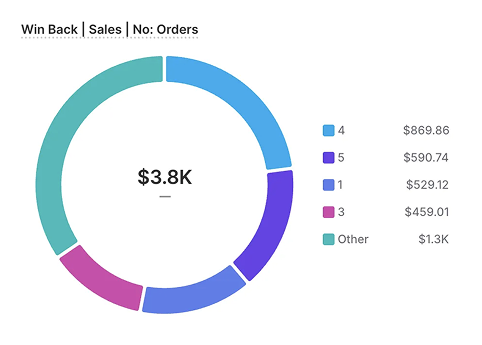
This report shows revenue contribution and order depth from customers captured via Win Back.
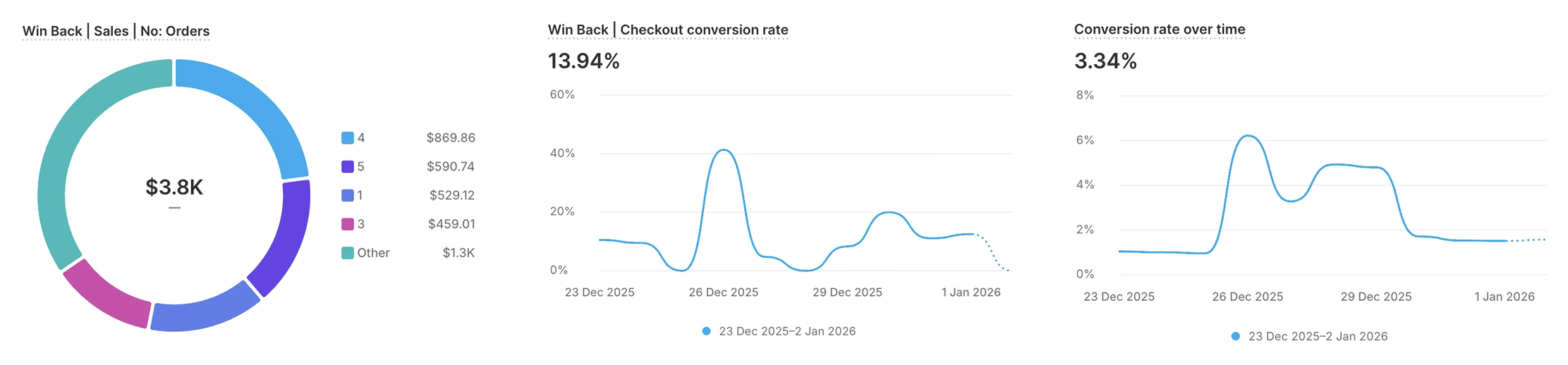
FROM sessions
  SHOW sessions, sessions_with_cart_additions, sessions_that_reached_checkout,
    sessions_that_completed_checkout, conversion_rate
  WHERE human_or_bot_session IN ('human', 'bot')
    AND customer_tags CONTAINS 'winback_customer'
  TIMESERIES day WITH TOTALS, CURRENCY 'AUD', PERCENT_CHANGE
  SINCE startOfDay(-30d) UNTIL today
  COMPARE TO previous_period
  ORDER BY day ASC
  LIMIT 1000
VISUALIZE conversion_rate TYPE line
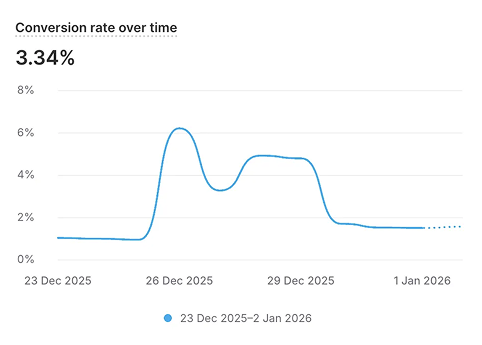
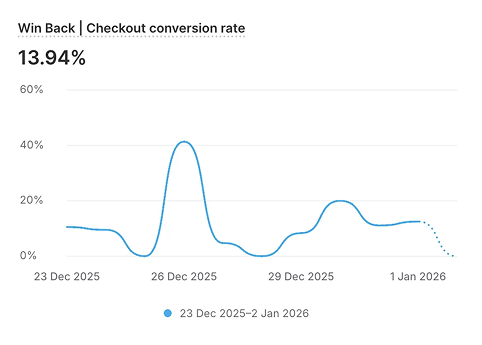
This report visualises conversion performance for customers tagged through Win Back campaigns.
These insights allow you to confidently scale Win Back campaigns while clearly demonstrating revenue impact to internal stakeholders.
Randomised, auditable draws reduce risk compared to manually choosing a winner. Win Back provides a compliant selection process and clear records, offering better protection for your brand. Campaigns must still follow your local laws and guidelines.
Yes. You can run multiple campaigns with separate draw periods and prizes. Each campaign tracks eligible entries independently.
Win Back applies a “winner” customer tag in Shopify. You can filter customers by this tag to view historical winners.
Plans are based on your monthly order volume so you pay in line with usage.
No. We don’t offer a free plan.
No—pricing is the same for Shopify and Shopify Plus. Plus stores can also access a checkout extension for enhanced experiences.
Grow your list and revenue. Win Back helps you run compliant “win your order back” campaigns, capture consent, and issue store credit natively in Shopify.
 Find it on the Shopify App Store
